Be careful not to heist the names of methods in wsadminlib.py...
The python language allows you to dynamically redefine a method to a variable, and vice-versa. This can be a nice feature if you do it intentionally. But it can be a nuisance to debug if unintentional. Here is a quick example:
First, define a method which returns the sum of two numbers:
ding@dingp:~$ python
Python 2.5.2 (r252:60911, Jan 20 2010, 21:48:48)
[GCC 4.2.4 (Ubuntu 4.2.4-1ubuntu3)] on linux2
Type "help", "copyright", "credits" or "license" for more information.
>>>
>>> def myMethod(i,j):
... return i+j
...
>>>
Pass in two numbers, set the return value to another variable, and it works as expected.
>>> k = myMethod(1,2)
>>> print k
3
>>>
But watch what happens next...
Thursday, November 11, 2010
Monday, August 16, 2010
How to set custom properties in Global Security?
Use wsadminlib's method setCustomPropertyOnObject().
Here is the method signature. The parameters are straightforward:
setCustomPropertyOnObject(object_id, propname, propvalue)
The pydoc is pretty good too. If a property with this name does not exist, the method creates it. If one already exists, the method sets the new value.
Here is an example:
sid = getObjectsOfType('Security')[0]
setCustomPropertyOnObject(sid,'andy.propkey','andy.propvalue')
save()
 We can then browse to the admin console and see the new custom property in the list.
Extra info: We can also query the value of a custom property with this method.
getObjectCustomProperty(object_id, propname)
Here is the method signature. The parameters are straightforward:
setCustomPropertyOnObject(object_id, propname, propvalue)
The pydoc is pretty good too. If a property with this name does not exist, the method creates it. If one already exists, the method sets the new value.
Here is an example:
sid = getObjectsOfType('Security')[0]
setCustomPropertyOnObject(sid,'andy.propkey','andy.propvalue')
save()

Extra info: We can also query the value of a custom property with this method.
getObjectCustomProperty(object_id, propname)


Friday, July 9, 2010
How to handle object-like strings?
Several wsadmin commands return 'object-like' strings as responses. That is, they return strings which look like objects, but are just strings. Very annoying.
We wrote several helper methods in wsadminlib.py to convert these object-like strings into real python lists and dictionaries. The helpers may seem silly at first, but having real objects makes searching and extracting values from responses much easier. Here are two examples...
Example 1
Consider this string:
'[ [key0 value0] [key1 value1] [key2 value2] ]'
This is the format of the response string which you get from several wsadmin commands. To a human, it is visually recognizable as a set of keys and values. But to python, it is nothing. It is a string which is tedious to parse and search, and the code is confusing to duplicate inline in various functional methods. What to do?
We wrote several helper methods in wsadminlib.py to convert these object-like strings into real python lists and dictionaries. The helpers may seem silly at first, but having real objects makes searching and extracting values from responses much easier. Here are two examples...
Example 1
Consider this string:
'[ [key0 value0] [key1 value1] [key2 value2] ]'
This is the format of the response string which you get from several wsadmin commands. To a human, it is visually recognizable as a set of keys and values. But to python, it is nothing. It is a string which is tedious to parse and search, and the code is confusing to duplicate inline in various functional methods. What to do?
Wednesday, May 12, 2010
How to install an application?
Use wsadminlib's method installApplication().
Here is the method signature. The parameter names are straightforward, and the pydoc is pretty good. The list of servers is meant to specify individual non-clustered servers. If a server is part of a cluster, just specify the cluster name.
def installApplication( filename, servers, clusternames, options )
Clusters
First let's install an app on a cluster of servers. Define the name of the ear file, and the name of the cluster. Then install the app, specifying an empty list for individual servers, and no options.
filename = '/tmp/pxyapps.ear'
clusternames = [ 'cluster1' ]
installApplication( filename, [], clusternames, None )
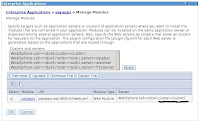 After saving the config, we can browse to the admin console, look at the app's mappings, and see it worked:
Individual servers
Next let's install an app on an individual non-clustered server. Define the server in a list of dictionaries containing the node name and server name. This time we specify an empty list for the clusternames.
Here is the method signature. The parameter names are straightforward, and the pydoc is pretty good. The list of servers is meant to specify individual non-clustered servers. If a server is part of a cluster, just specify the cluster name.
def installApplication( filename, servers, clusternames, options )
Clusters
First let's install an app on a cluster of servers. Define the name of the ear file, and the name of the cluster. Then install the app, specifying an empty list for individual servers, and no options.
filename = '/tmp/pxyapps.ear'
clusternames = [ 'cluster1' ]
installApplication( filename, [], clusternames, None )
 After saving the config, we can browse to the admin console, look at the app's mappings, and see it worked:
Individual servers
Next let's install an app on an individual non-clustered server. Define the server in a list of dictionaries containing the node name and server name. This time we specify an empty list for the clusternames.
Subscribe to:
Posts (Atom)